

You've entered your weight, chosen an activity level and pressed calculate. Now you're looking at a calorie allowance and a handful of macro targets, wondering whether they're realistic and what you're supposed to eat tomorrow.
A macro calculator for weight loss can make planning easier, but its output isn't a verdict on your metabolism. Treat it as a starting hypothesis: check the arithmetic, build meals you can repeat and test whether the plan fits your actual life.
Table of Contents
- Example Macro Targets for Weight Loss
- The Inputs a Macro Calculator Needs
- Choosing a Calorie Deficit That Holds
- Protein Targets by Body Weight
- Splitting Carbs and Fat Around Protein
- How to Set Your Targets in Calorie Genie
- Adjust Your Targets After Two to Four Weeks
Example Macro Targets for Weight Loss
A calculator usually returns a daily calorie target plus protein, fat and carbohydrate targets in grams. These hypothetical profiles show what that output might look like, using the same calculation choices so you can compare them.
Example calorie and macro targets for weight loss
| Profile | Maintenance (est.) | Target (500 kcal deficit) | Protein (1.6 g/kg) | Fat (25% of target) | Carbohydrate remaining |
|---|---|---|---|---|---|
| Woman, 57 kg, 165 cm, 30 years, activity 1.55 | About 2,000 kcal | About 1,500 kcal | 91 g | 42 g | 190 g |
| Man, 70 kg, 175 cm, 35 years, activity 1.55 | About 2,520 kcal | About 2,020 kcal | 112 g | 56 g | 267 g |
These are worked examples, not prescriptions. The protein setting illustrates a resistance-training-oriented plan, while the fat allocation leaves room for carbohydrate; neither setting is compulsory for every reader.
Check one row yourself
For the hypothetical woman, subtracting the chosen deficit from estimated maintenance produces the calorie target. Multiplying body weight by the chosen protein factor produces the protein allowance, then the fat allocation takes its chosen share of calories.
Using standard macro bookkeeping, protein and carbohydrate contribute about four calories per gram, while fat contributes about nine. The arithmetic for her example is:
- Calorie target: 2,000 − 500 = 1,500 kcal.
- Protein: 57 × 1.6 = 91.2 g, using about 365 kcal.
- Fat: 1,500 × 0.25 ÷ 9 = about 42 g.
- Carbohydrate: (1,500 − 364.8 − 375) ÷ 4 = about 190 g.
Keep unrounded values while calculating, then round the displayed gram targets. Otherwise, rounding each step can make the final calorie total look slightly inconsistent.
Carbohydrate changes whenever the calorie target, protein allocation or fat allocation changes, which is why it's calculated last. Another calculator may return slightly different numbers because it uses a different energy equation or different assumptions.
Sanity check: A result that leaves little room for varied meals deserves scrutiny, not automatic obedience.
Before treating any output as your daily allowance, check the inputs that produced it. An ambitious activity selection can make a tidy-looking calculation unsuitable for your routine.
The Inputs a Macro Calculator Needs
The calculator uses your answers in sequence. Body weight helps establish protein and resting energy needs; height, age and sex refine the resting-energy estimate; activity adjusts that estimate; and your goal determines the proposed calorie target.
This diagram shows the order of those inputs.
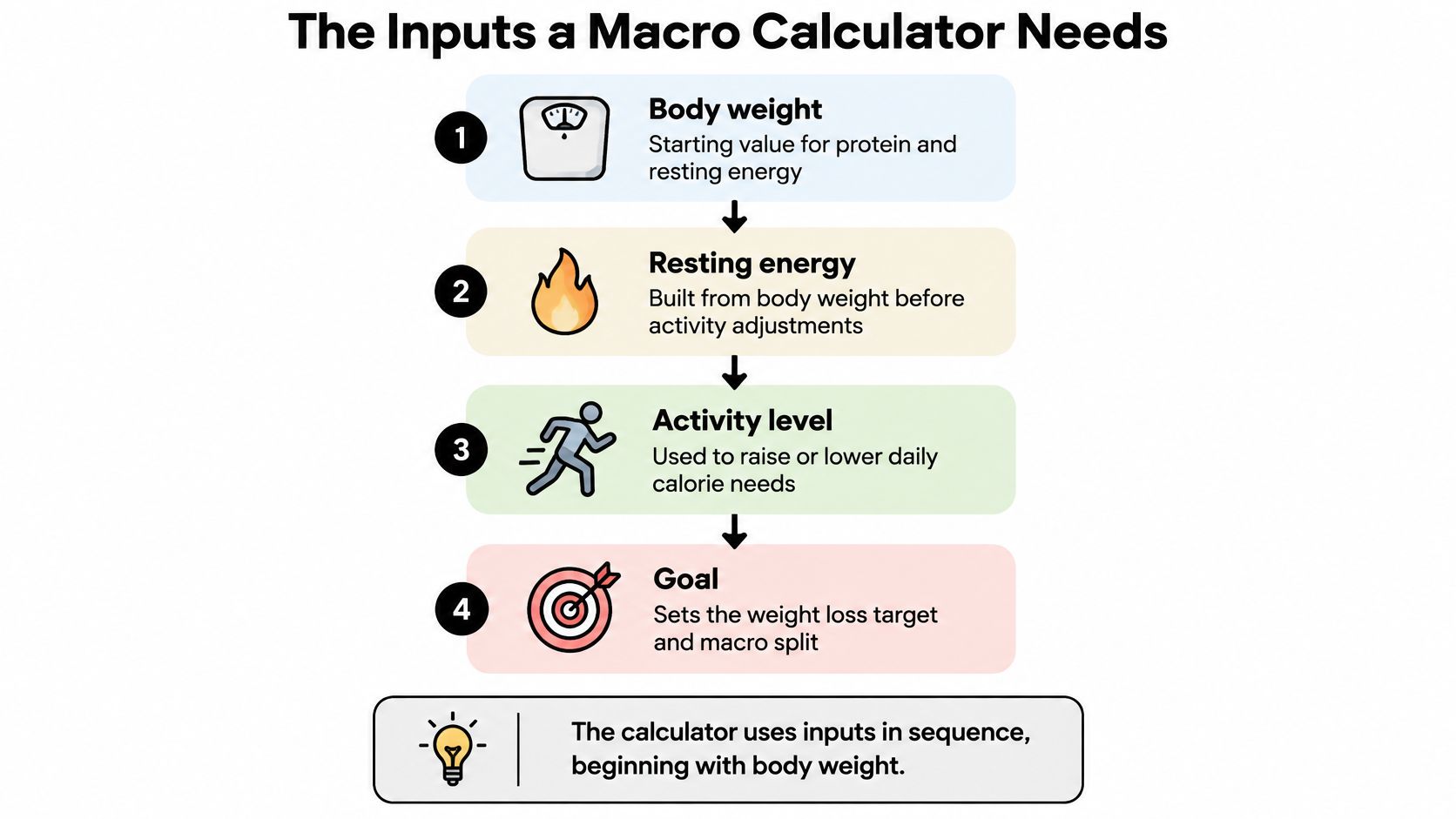
Enter measurements before choosing activity
Use a current body weight rather than a remembered weight from an earlier phase of dieting. Check the units too: confusing pounds with kilograms or inches with centimetres can distort the entire calculation.
Height, age and the equation's sex input help estimate resting energy expenditure, meaning the energy your body uses before accounting for your usual movement. That isn't the same as maintenance calories, which include activity.
For a hypothetical calculation, suppose the man in the example has estimated resting needs of about 1,624 kcal. Applying an illustrative activity multiplier of 1.55 gives approximately 2,520 kcal for maintenance; choosing 1.725 instead raises it to about 2,800 kcal.
Those are alternative assumptions, not measurements of what he burns.
Choose an ordinary week, not your best week
An activity category should reflect your whole routine, including work, commuting, chores and exercise. A demanding workout doesn't necessarily make an otherwise seated day highly active.
- Mostly seated routine: Consider how little movement happens outside planned exercise.
- Regular training: Include the sessions you consistently complete, not the schedule you hope to start.
- Physical work: Account for movement across the working day, rather than judging activity only by gym attendance.
In the same hypothetical calculation, choosing 1.55 rather than 1.375 adds roughly 285 kcal to estimated maintenance. That difference can materially change the proposed deficit.
Our guide to how many calories you need a day explains the distinction between resting needs and daily expenditure. Before trusting a target, change one input at a time and inspect the result, then correct any assumption that moves the output more than your circumstances justify.
Choosing a Calorie Deficit That Holds
Start with the calorie target, because a macro split only divides the energy available. A carefully balanced protein, carbohydrate and fat distribution can't guarantee weight loss if the maintenance estimate is wrong.
The familiar fixed-calorie rule also needs caution. The NIH treatment guidance and accompanying planning context describe the historical 3,500-calorie-per-pound approach, but long-term loss can be slower because energy expenditure changes as intake and body weight change; the clinical guidance describes approximately 500–1,000 kcal daily deficits producing about 1–2 pounds of weekly loss, particularly during the first six months.
Use guideline ranges as context
The 2025 VA/DoD obesity guideline describes initial deficits of roughly 500–750 kcal per day and weight-loss goals of about 0.5–2 pounds weekly, while supporting Mifflin–St Jeor estimates using actual body weight for adults with overweight or obesity.
Calorie deficit size and expected weekly loss
| Daily deficit | Typical weekly loss or guideline goal | Source and context |
|---|---|---|
| 300–500 kcal per day | About 0.5–1 lb a week | Earlier NIH guidance for people with BMI values of 27–35 |
| 500–750 kcal per day | About 0.5–2 lb a week | VA/DoD initial deficit and weight-loss goals |
| 500–1,000 kcal per day | About 1–2 lb, or 0.45–0.91 kg, a week | NIH clinical guidance, particularly the first six months |
These are planning ranges, not promises. The middle row pairs a guideline's initial deficit recommendation with its broader weight-loss goals; it isn't a precise conversion between calories and pounds.
A moderate starting deficit is useful only if it leaves enough food to support nutrition, recovery and adherence. The NIH planner's warning is specific: intake below 1,000 calories daily won't meet food-group and nutrient recommendations.
A lower target isn't automatically a better target. Choose an allowance you can follow without turning ordinary eating into a daily struggle.
Our calorie calculator provides an estimate, not a reason to ignore persistent hunger, exhaustion or difficulty recovering from exercise. Calorie estimates are a guide, not medical advice.
If progress slows despite following the plan, review intake and activity before reducing food again. Anyone with a medical condition, pregnancy or an eating-disorder history should get individual professional advice before restricting intake.
Protein Targets by Body Weight
For a 70 kg person, the basic arithmetic gives a protein reference of 56 g per day at 0.8 g/kg, or 112 g at 1.6 g/kg. These are starting points to compare with your goals and routine, not precise prescriptions.
The National Academies' protein recommendations set the healthy-adult RDA at 0.8 g/kg/day. It is a population-level adequacy benchmark, rather than a specialized target for dieting or muscle retention.
Separate adequacy from training goals
A systematic review and meta-analysis of energy-restricted diets in older adults included 20 randomized controlled trials in adults aged 50 and older. Higher-protein diets were associated with better lean-mass retention and greater fat-mass loss, although total body-mass loss was comparable. Protein can support body composition without making the scale fall faster, and the findings do not establish one ideal intake for every age or training routine.
Resistance-training research suggests that protein above a moderate level adds little extra muscle benefit. The 1.6 g/kg figure below is an illustrative training reference, not a universal ceiling or a finding attributed to a review protocol.
Protein floor and training reference by body weight
| Body weight | RDA floor (0.8 g/kg) | Training reference (1.6 g/kg) |
|---|---|---|
| 45 kg | 36 g | 72 g |
| 57 kg | 46 g | 91 g |
| 70 kg | 56 g | 112 g |
| 90 kg | 72 g | 144 g |
The table multiplies body weight by each factor and rounds to whole grams. Use the values to check a calculator's output: a 70 kg person, for example, can verify the 112 g reference by calculating 70 × 1.6. Training routine and individual circumstances affect which starting point makes sense; test your target over several weeks rather than treating one calculation as settled.
Make the target practical
Spread protein across meals instead of leaving most of it for dinner. Breakfast could include yogurt, eggs or tofu; lunch might include beans, fish or poultry. Plan dinner around a protein source, then use snacks to fill any remaining gap.
A higher target still needs room for vegetables, fibre-rich foods and dietary fats. People with kidney disease or other medical conditions should seek professional advice before increasing protein substantially.
Splitting Carbs and Fat Around Protein
Once protein is set, allocate fat and calculate carbohydrate from the remaining calories. This order makes the arithmetic easy to inspect and avoids choosing an attractive percentage split that doesn't fit your needs.
The National Academies' adult Acceptable Macronutrient Distribution Ranges are 10–35% of energy from protein, 45–65% from carbohydrate and 20–35% from fat; these support nutrient adequacy and chronic-disease risk reduction rather than guaranteeing weight loss.
| Macro | Adult reference range | Role in a calculator |
|---|---|---|
| Protein | 10–35% of calories | Check the percentage after setting grams by body weight |
| Carbohydrate | 45–65% of calories | Allocate the remainder and assess food quality and training needs |
| Fat | 20–35% of calories | Preserve an allowance before filling carbohydrate |
Use these ranges as a broad check, not proof that every result is individualized. A protein percentage can deliver too little at a restrictive calorie intake or an unnecessarily large amount at a high intake.
Work through the remaining calories
For the hypothetical man's 2,020 kcal plan, the allocation looks like this:
- Reserve protein calories. His 112 g protein allowance uses about 448 kcal, leaving 1,572 kcal.
- Allocate fat. Choosing 25% of the target gives 505 kcal from fat, or about 56 g.
- Calculate carbohydrate. Subtracting 448 and 505 from 2,020 leaves 1,067 kcal, equivalent to about 267 g carbohydrate.
For this planning method, use the lower end of the adult fat range as a guardrail before allocating the remainder to carbohydrate. It's a general design choice, not an individualized medical minimum.
Check the totals: Add the calories assigned to protein, fat and carbohydrate. Small rounding differences are normal; a large mismatch means an input or conversion needs checking.
Display both grams and percentages. Grams help you plan meals, while percentages make an unusual allocation easier to spot.
When preferences or training change, carbohydrate is often the simplest adjustment after protecting protein and an adequate fat allowance. If you increase fat while keeping calories constant, carbohydrate must decrease; you can't raise both without changing the total.
How to Set Your Targets in Calorie Genie
Use the same checking process when an app generates the numbers. During setup, we use your goal, body stats and activity level to set daily calorie and macro targets, which you can adjust at any time in Settings.
The setup flow keeps the initial estimate separate from your decision to use it.
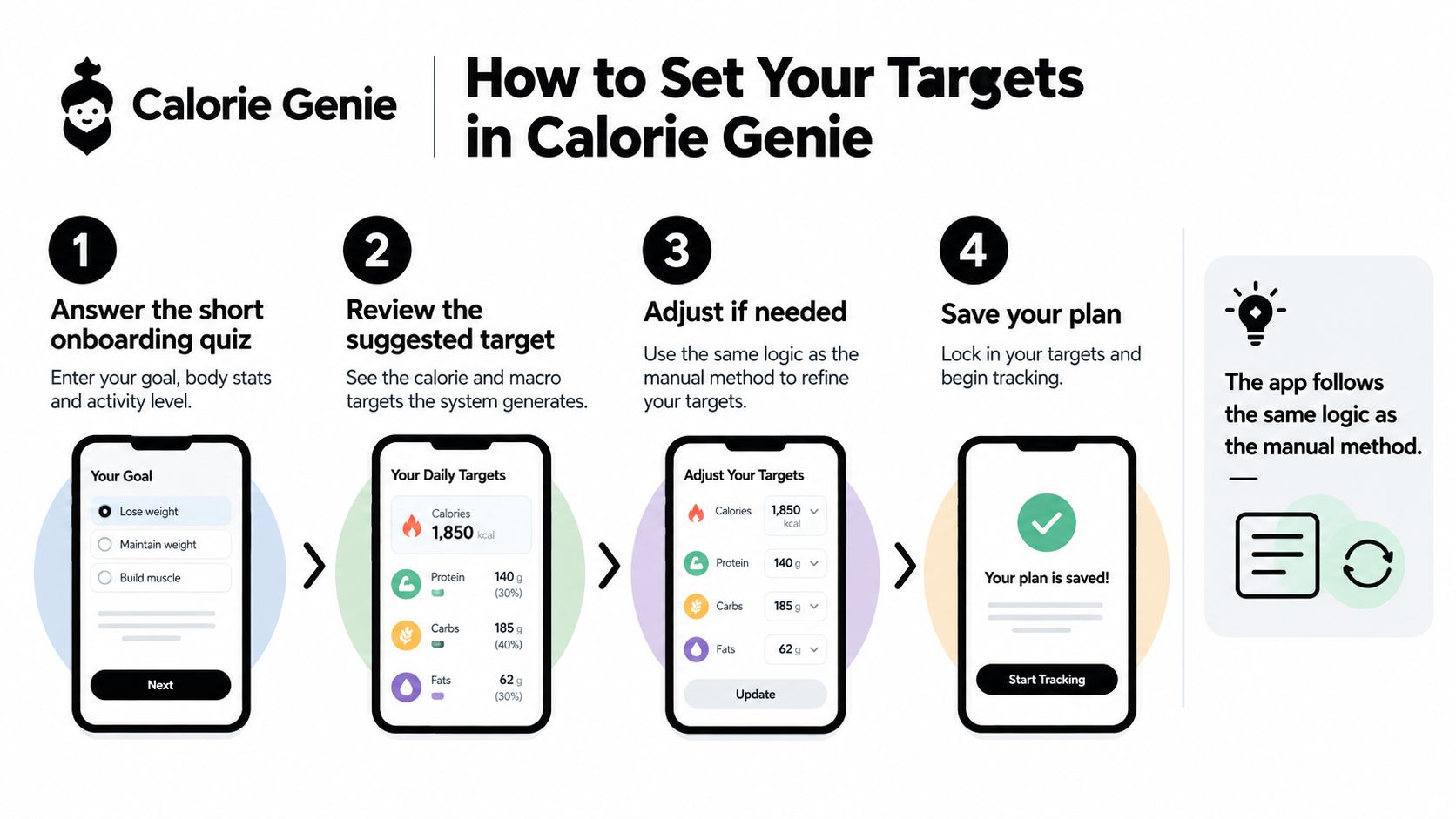
Set up, check and start logging
Answer the onboarding quiz. Enter your goal, current body stats and usual activity level. Your answers should describe your present routine, not the routine you intend to build.
Review the suggested targets. Check whether the calorie allowance leaves room for satisfying meals and whether protein fits your body size and training. This is also the moment to catch an activity category that's too ambitious.
Log a meal with the camera. Point it at a meal, drink, barcode or whole restaurant menu, with no searching or weighing. Review the estimated foods, portions and macros rather than assuming the first result is exact.
Correct portions before saving. Tap any ingredient to change its portion. An overestimated serving can make the day look fuller than it was, while an omitted ingredient can make intake look lower.
Record weigh-ins. Keeping weight history alongside intake helps you assess whether the plan is producing the intended trend. Individual readings need context, so don't judge the target from a single entry.
Revise targets in Settings when appropriate. A change in training, appetite or routine may justify a different allocation. Make deliberate changes rather than editing targets after every difficult day.
The video provides another way to follow the process.
Photo-based nutrition estimates are a guide. Reviewing them consistently makes your diary more useful, but it doesn't turn either the food estimates or your targets into exact measurements.
Adjust Your Targets After Two to Four Weeks
Suppose your weight is flat after a few weeks, but your logging has been consistent. Treat the starting target as a hypothesis to check, not a verdict. Compare weigh-ins taken under similar conditions and look for a pattern, since a salty meal, hard workout or disrupted routine can shift the scale temporarily.
Keep a target that feels workable and is producing the trend you want. Waist measurements, hunger, recovery and training performance can help you interpret what the scale alone misses.
Choose the response that fits the pattern
- Weight is trending down and you feel well. Keep the target. There's no need to cut calories further just because the plan feels manageable.
- Weight appears unchanged despite consistent logging. Review portions, drinks, cooking fats and everyday movement. If the trend remains flat after those checks, consider a modest adjustment rather than repeated cuts.
- Loss is unusually fast or you feel depleted. Reconsider the deficit and increase intake when appropriate. Persistent fatigue, dizziness or impaired recovery calls for professional advice.
- Daily readings jump around. Keep collecting comparable readings before deciding. Water shifts can hide a trend, and a stall alone doesn't prove your metabolism is damaged.
A food diary for tracking meals can help you compare what you intended to eat with what you logged. Use the record to refine your estimate, not to punish yourself with a lower allowance.
Calorie Genie is free to download on iOS and Android. Its calorie estimates are a guide, not medical advice. For support, email support@calorie-genie.com.
Calorie Genie AI pairs adjustable calorie and macro targets with photo-based food logging, helping you compare your starting estimate with your eating pattern over time. Visit Calorie Genie AI to review and refine your plan as you learn what works for you.