
The pot of chili has been on for an hour, the pan is still hot, and the app wants a number you don't have. One serving. You didn't measure the bowls. You added a slug of oil to the onions without thinking about it, and the pot has cooked down by a third since you started.
Many guess at this point, and the guess usually runs low. A generous home portion gets logged as a tidy round number, the log looks neat, and the actual figure sits somewhere else entirely.
The fix is arithmetic anyone can do, and it takes about five minutes per recipe the first time. Add up what went into the pot. Divide by what came out, measured by weight rather than by bowls. Then write the numbers down so you never repeat the work for that dish again. Knowing how to calculate calories per serving is mostly a matter of doing those three things in that order, without skipping the middle one.
Table of Contents
- The Formula and a Worked Example
- How to Total a Recipe's Calories Step by Step
- Calculating Without a Kitchen Scale
- Dividing a Batch Fairly When Portions Differ
- Calories per Serving on Packaged Food Labels
- Mistakes That Skew the Per-Serving Number
The Formula and a Worked Example
Calories per serving equals the total calories in the whole recipe divided by the number of portions you serve. That sentence is the entire method. Everything below is bookkeeping.
Say you're building a chicken and broccoli stir-fry for four people. You weigh as you go, so the worksheet looks like this.
Worked example: calories for a stir-fry serving four
| Ingredient | Grams used | kcal per 100 g |
|---|---|---|
| Raw chicken breast | 500 | 120 |
| Cooked brown rice | 300 | 112 |
| Olive oil | 15 | 884 |
| Raw broccoli | 300 | 34 |
| Reduced-sodium soy sauce | 30 | 53 |
| Batch total | 1,145 g | 1,187 kcal |
Each row works the same way: grams multiplied by kilocalories per 100 g, then divided by 100. The chicken gives 500 × 120 ÷ 100 = 600 kcal. The cooked rice gives 300 × 112 ÷ 100 = 336 kcal. The oil gives 15 × 884 ÷ 100 = 133 kcal. Broccoli lands at 102 kcal and the soy sauce at 16 kcal. Add the five rows and the batch holds 1,187 kcal, which divided by four portions is about 297 kcal per serving.
Stare at the oil row for a second. Fifteen grams is barely a spoonful, and it contributes 133 kcal, more than the entire 300 g of broccoli. It's also the row that often gets left off the sheet, because oil goes into the pan before anyone starts thinking about numbers.
The weight column matters as much as the calories. This batch weighs 1,145 g raw, and once it's cooked you can weigh it again and divide the 1,187 kcal by that new figure. That single step handles the case where the four portions turn out nothing like equal.
Treat the output as an estimate. A chicken breast entry on a database might describe a leaner bird than the one in your fridge, and rice gains or loses water depending on how long it sits. The result is a guide, not medical advice, and it's still far closer than a guess.
The table is a template. Swap in your own rows, keep the same columns, and put the batch calories in a fourth column of your own sheet so the arithmetic stays visible.
How to Total a Recipe's Calories Step by Step
The sequence matters more than the spreadsheet. Run these six steps in order and the number at the end is one you can defend to yourself; skip step two and the rest falls apart.
Here's the whole flow as a single picture.
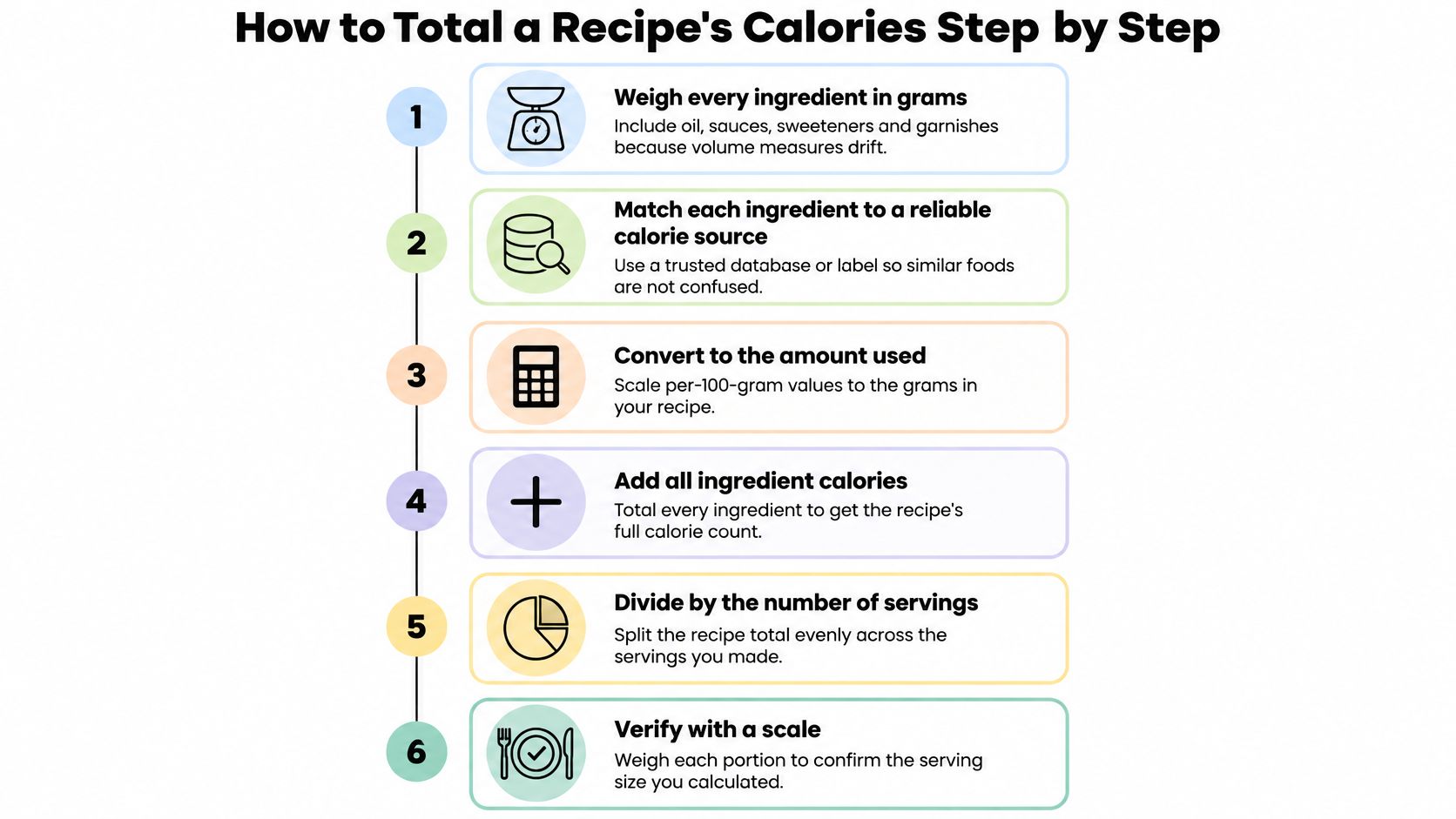
Weigh every ingredient in grams, including the invisible ones. Oil, butter, sauces, honey, the parmesan you grated over the top at the end. Cups and spoons drift with how you scoop and how tightly the food packs, and grams end the argument. Write each weight down as you add it, because reconstructing the list once the pan is dirty never works.
Match each ingredient to an entry in the same state you weighed it. Raw chicken needs a raw entry. A cooked rice weight needs a cooked rice entry. The USDA FoodData Central Foundation Foods documentation sets out the ingredient-level method in exactly this order and names the state mismatch, alongside forgotten cooking fats, as the most consequential practical error. Use the package label where there is one and the database where there isn't.
Convert each row to calories. Grams multiplied by kcal per gram is the same sum as grams ÷ 100 × kcal per 100 g. Do every row, especially the ones that look too small to bother with.
Add the rows to get the batch total. Nothing gets divided yet. Keeping the batch figure separate means you can re-portion later without redoing the sums.
Divide by the portions you will make. Not the "serves six" on the recipe you adapted from, and not the number of people at the table. Count the containers you fill.
Record four numbers on the recipe card. Batch calories, portion count, finished batch weight and calories per gram. Next time this dish appears, you skip straight to weighing your bowl.
Where a database total and your own arithmetic disagree
The same USDA documentation notes that many energy values are calculated using general Atwater factors, 4 kcal per gram for protein, 9 kcal per gram for fat and 4 kcal per gram for carbohydrate, while some foods use food-specific factors. That's why a figure you derive from macros can sit a little apart from the printed energy value for the same food. Neither is wrong. They're produced by different routes.
A sensitivity check that takes two minutes
Pick the one ingredient you're least sure about, usually something cooked, and redo its row using the alternative database entry. If the per-serving figure moves by a few calories, your estimate is solid. If it swings widely, write the range on the card and stop pretending to two decimal places.
An estimate built from weighed ingredients and honest portions will beat a precise-looking number built from guesses every time.
When you log a portion, record the weight you ate rather than a count of bowls. If you're logging a photo-scanned meal rather than a home recipe, you can tap any ingredient to adjust its portion or swap it before saving, which keeps the plate in front of you and the entry in the app pointing at the same thing.
Calculating Without a Kitchen Scale
No scale in the drawer, no problem, as long as you accept a wider margin. The method holds; the inputs get rougher and should be labelled that way.
Start with the package. If a label states a net weight in grams and a serving count, divide one by the other to get grams per serving, then use that as your row weight.
Convert volume using a reference, not a hunch. A level tablespoon of oil weighs about 14 g, which is roughly 120 kcal. Cooked rice and other grains are listed by weight in USDA portion data, so look up the gram weight for the exact measure you used before you multiply.
Build a personal conversion card. Weigh your most-used ingredients once (oil, rice, nut butter, the mug you always use for oats) and write the gram weights on a card that lives with your recipes.
Mark which rows are estimates. A figure that came from a volume conversion deserves a note on the card, because it carries more uncertainty than a weighed row.
Divide the cooked total by the portions you made. Same logic as the weighed method, applied to looser inputs.
The trade-off is uneven. Volume measures are fine for low-calorie seasonings, where being off by a teaspoon changes almost nothing. For oil, nut butter and sugar they're a liability, because a small volume error moves the total the most.
Weigh the things that carry calories. Estimate the things that don't.
If you're unsure what a realistic portion looks like once it's on the plate, this guide to figuring out portion size covers the visual shortcuts that work when the scale stays in the cupboard.
Dividing a Batch Fairly When Portions Differ
Dividing by bowls only works when every bowl holds the same amount of the same mixture. Soups, stews, rice, pasta and grains break that assumption every time, because water leaves during a simmer and gets absorbed during a boil. The weight of the dish changes while the calories stay put, so a volume-based serving estimate can drift badly.
Take a batch that contains 2,400 kcal and weighs 1,800 g after cooking, the kind of figure a thick stew throws off once it has reduced. Divide 2,400 by 1,800 and you get about 1.33 kcal per gram. That one number, as this calories-per-gram walkthrough explains, is what turns an uneven pot into honest portions.
Calories by portion weight from a 2,400 kcal batch weighing 1,800 g
| Portion weighed | Calories (at 1.33 kcal per gram) |
|---|---|
| 150 g | about 200 kcal |
| 250 g | about 333 kcal |
| 350 g | about 467 kcal |
| 450 g | about 600 kcal |
The same batch split into six containers averages 400 kcal each, but the six containers almost never weigh the same. One gets the chunks, another gets broth. The scale settles it.
Getting the batch weight without lifting anything heavy
Put the empty pot on the scale and press tare before you start, then weigh the pot with the finished food in it and the reading is your batch weight, no subtraction needed. If the pot won't fit on a small kitchen scale, weigh yourself, then weigh yourself holding the pot, and subtract the first figure from the second.
Weigh the batch after the last thing goes in. A drizzle of oil or a spoon of sauce added afterwards changes both the total calories and the total weight, so measuring before it goes in gives you a per-gram figure that's wrong in two directions at once.
Leftovers use the same number. Weigh what's still in the pot, multiply by 1.33, and you know what's left without recounting anything. A 150 g taste while cooking is about 200 kcal, and it belongs in the log like any other portion.
Weigh the batch, not the bowl.
Calories per Serving on Packaged Food Labels
A labelled serving works like the cup in a measuring set: a fixed unit for describing the food. It is a reference amount chosen to describe a typical helping, which answers a different question from the one you are asking at the kitchen counter.
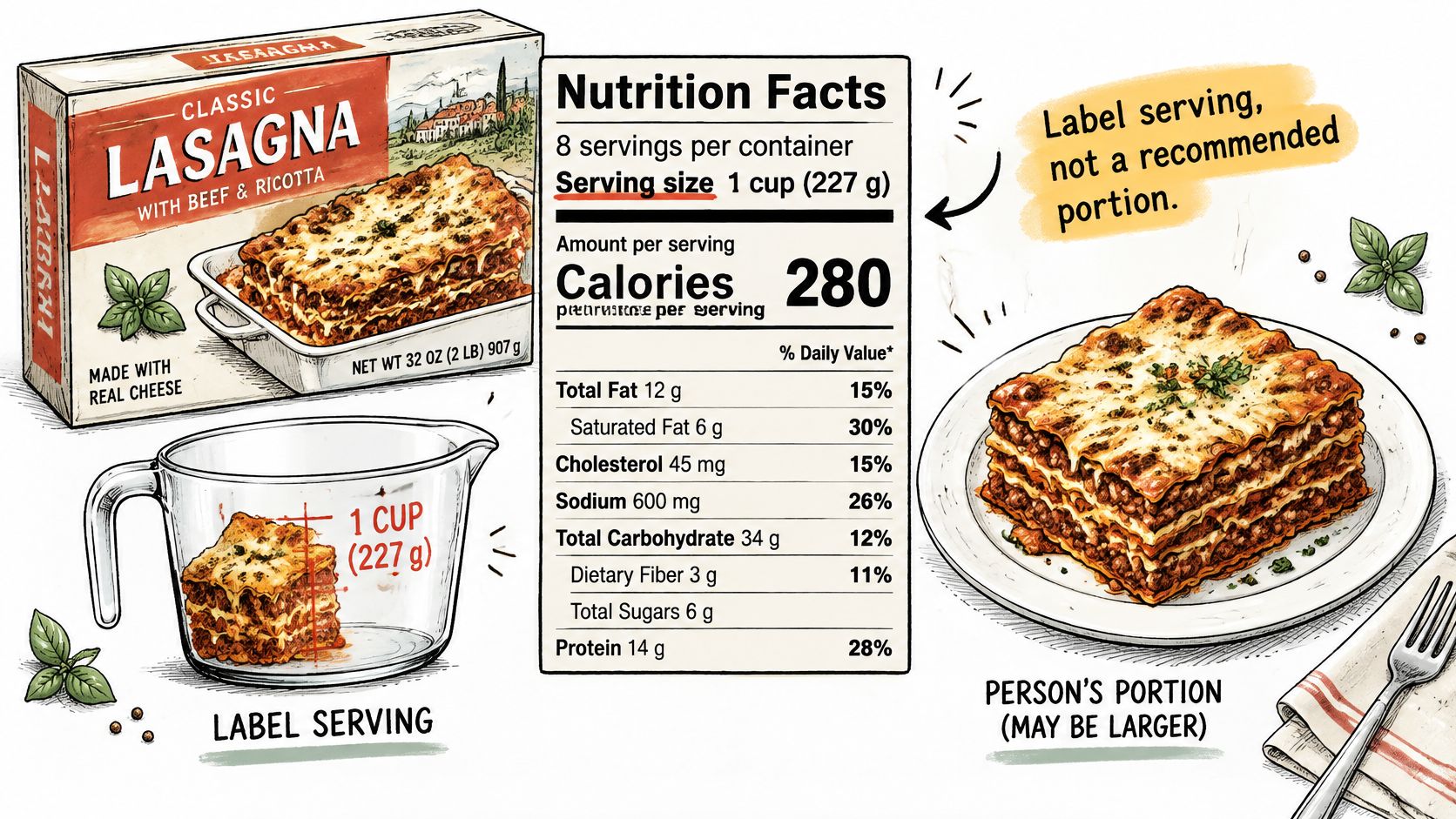
A package often holds several servings at once, so the calories in the whole thing are the per-serving figure multiplied by the number of servings inside. Finish a multi-serving tray on a tired evening and the log needs every one of them. The FDA's guide to the Nutrition Facts label walks through how the serving line and the calorie line work together on a real panel.
The FDA's summary of the changes to the Nutrition Facts label explains that serving sizes are meant to reflect typical consumption rather than ideal intake, and that some packages now carry dual-column labels for people who eat the whole container. That second column exists for exactly this problem.
Three numbers, not one
Most confusion comes from collapsing three separate figures into a single one.
Calories per labelled serving. The big number on the panel. Useful only when you eat precisely that amount.
Calories per 100 g or per ounce. The comparison figure, and the one that scales to any weight you like.
Calories in the portion you ate. The only number your log cares about.
Two routes get you to the third. Divide the weight you ate by the serving weight, then multiply by the calories per serving. Or take the calories per 100 g, multiply by the grams you ate, and divide by 100. When the panel prints a package total, use it rather than multiplying a rounded per-serving figure several times over.
If you want the panel walked through end to end, this video follows each line in order.
One habit covers most of it. Before you log a packaged food, write down the portion weight rather than the number of servings, and check whether the panel follows US conventions or another country's. Recording "one serving" when you ate one and a half is the same trap as splitting a pot by bowls instead of by weight: the count feels tidy, and the figure comes out wrong. A single pass through how to read a nutrition label will show you where each figure sits on the panel you have in your hand.
Mistakes That Skew the Per-Serving Number
A recipe card says it serves six. Your containers say four. Whatever number you log from that mismatch will be wrong in the same direction every time, and it is one of four errors that do most of the damage. Knowing which direction each error pushes is half the fix.
Common errors in per-serving calculations and their fixes
| Error | Effect on the number | Fix |
|---|---|---|
| Leaving out cooking oil | Understates the total by about 120 kcal per tablespoon | Weigh the oil and add it to the batch total |
| Using a raw entry for a cooked ingredient | Skews rice, pasta and grains by a large margin | Match the database entry to how you weighed the food |
| Dividing by planned servings | Understates the per-serving figure when fewer portions are made | Divide by actual portions, or by batch weight |
| Rounding each ingredient early | Small errors add up across the batch | Keep unrounded totals until the final step |
The rounding error has a rule behind it on packaged food. Printed US labels round calorie declarations to a set increment, and very small amounts can be declared as zero. That convention exists to keep labels readable, not to govern your worksheet, so keep every ingredient's figure intact, add them up, and round once at the end if you round at all.
Dividing by planned servings catches people out because recipe cards assume an ideal world. A dish that says it serves six but fills four containers gives each logged portion only two-thirds of its true calories. The batch total is spread across six shares that never existed, so every serving you recorded is low by about a third, and the log absorbs that gap each time you cook the dish. Weighing the finished batch closes the loophole entirely. If a pot comes to 1,200 g and four equal containers each get 300 g, every serving is exactly a quarter of the total, whatever the card claimed.
Small errors matter most where the calories are dense. A tablespoon of oil, a heaped spoon of nut butter, a handful of nuts, the sugar in a glaze: these are the rows where a sloppy measure moves the total. Spot-check those three or four lines on every recipe and you capture most of the available accuracy. The numbers behind calories in a tablespoon of olive oil show why free-pouring is usually the first row worth checking.
Weigh once, log the weight, and let the arithmetic do the rest. Calorie Genie AI is built for exactly that habit: point your camera at a plate and Genie identifies each food, estimates the portions, and returns calories, protein, carbs and fat. Every ingredient is editable, so if the estimate is off you can tap it and adjust the portion before saving, and the meal lands against the daily target the app set during setup. Visit Calorie Genie AI and try a scan on your next home-cooked plate.